

GOF ECO · Reference-netlist flow
Netlist-to-netlist ECO for larger functional changes.
Use a re-synthesized Reference Netlist to repair the Implementation Netlist. GOF identifies non-equivalent logic, generates an optimized patch, and verifies the repaired design in one reviewable flow.
GOF ECO
Compare · isolate · optimize · fix
Built-in logic equivalence engine
Patched netlistECO scriptLEC results
01 Most widely used GOF flow
02 Larger ECO scope
03 Minimum-size patches
04 Built-in LEC
Choose by change scope
Use it when the ECO is bigger than an RTL-guided patch.
Netlist-to-netlist ECO keeps the established synthesis reference flow and gives GOF a complete gate-level target. That extra context supports broader structural changes.
NETLIST → NETLISTMost widely used
Best for larger or more extensive ECOs
Compare the re-synthesized target design directly with the implementation database. GOF works top-down through non-equivalent modules and optimizes each required logic-cone patch.
- Full gate-level reference
- Broader change coverage
- Optional SVF-assisted mapping
~2 days end to endwhen a full reference re-synthesis is required; synthesis is the dominant delay
RTL → NETLISTFaster path
Prefer RTL-guided ECO for localized changes
Skip reference re-synthesis when the change is small to medium-sized and can be derived directly from the original and modified RTL.
Compare the faster RTL-guided flowFrom changed RTL to verified netlist
A six-step automatic ECO flow.
Every stage produces something concrete to inspect: mapped comparison points, the selected patch, an ECO report, output netlist, and equivalence results.
- 01
Modify RTL
Make the required functional change in the source design.
- 02
Build the reference
Re-synthesize the full design or only the affected sub-modules with matching constraints.
- 03
Load both netlists
Read the Reference and Implementation Netlists, libraries, and optional SVF data.
- 04
Map differences
Use top-down LEC to locate non-equivalent modules and comparison points.
- 05
Generate the patch
fix_designanalyzes the affected cones and applies optimized minimum logic. - 06
Verify and hand off
Review the report, check the design, write the netlist and ECO script, then run LEC.
How GOF localizes the change
Fix the failing cone, not the surrounding design.
For each failing comparison point, GOF extracts the corresponding logic cones from both databases. It derives only the logic needed to make the implementation point equivalent to the reference point.
IMPLEMENTATION CONENon-equivalent pointMismatch
↔
REFERENCE CONETarget functionReference
GOF optimized minimum patch
Inputs
What the flow needs.
SVF data is optional for many designs, but strongly recommended when multibit flops or significant naming changes make key-point mapping harder.
Core automation
The complete flow is controlled by one reviewable Perl script.
Load the two design trees, constrain test-only logic, fix the design, inspect the report, and write the deliverables. Run it non-interactively with gof -run run_example.pl.
setup_eco("eco_example");
read_library("standard_cells.lib");

read_svf("-ref", "reference.svf.txt");
read_svf("-imp", "implementation.svf.txt");
read_design("-ref", "reference.gv");
read_design("-imp", "implementation.gv");
set_top("topmod");

set_ignore_output("scan_out*");
set_pin_constant("scan_enable", 0);
set_pin_constant("scan_mode", 0);

fix_design();
report_eco();
check_design("-eco");
write_verilog("eco_verilog.v");
run_lec();
Included example
Run the shipped case before using your design.
The released GOF package includes a runnable automatic ECO example under GOF/example.
35
gates in the initial logic cone
→1 + 8one complex cell and eight inverters after optimization
Implementation reference
Go deeper when the design requires it.
The complete production script and advanced mapping guidance remain here, without getting in the way of the core flow.
Full automatic ECO example script+
Runnable netlist-to-netlist automatic ECO example:
# GOF ECO script, run_example.pl
use strict;
set_log_file("ref_net_eco.log");
setup_eco("eco_example");# Setup ECO name
read_library("tsmc.5nm.lib");# Read in standard library
# SVF files are optional, best to be used when the design involves multibit flops
#read_svf("-ref", "reference.svf.txt");       # Optional, must be loaded before read_design, must be in text format
#read_svf("-imp", "implementation.svf.txt");  # Optional, must be loaded before read_design, must be in text format
read_design("-ref", "reference.gv");# Read in Reference Netlist
read_design("-imp", "implementation.gv");# Read in Implementation Netlist Which is under ECO
set_top("topmod");# Set the top module
# Preserve DFT Test Logic
set_ignore_output("scan_out*");
set_pin_constant("scan_enable", 0);
set_pin_constant("scan_mode", 0);
fix_design();
save_session("current_eco_name"); # Save a session for future restoration
report_eco(); # ECO report
check_design("-eco");# Check if the ECO causes any issue, like floating
write_verilog("eco_verilog.v");# Write out ECO result in Verilog
run_lec(); # Run GOF LEC to generate Formality help files
gexit; # Exit when the ECO is done, comment it out to go to interactive mode when 'GOF >' appears
Reduce synthesis scope with sub-module replacement+
Performing a complete top-level netlist synthesis can be time-consuming. GOF provides APIs enabling the integration of newly synthesized sub-modules into the original pre-layout netlist, along with updates to the top-level SVF file. This incremental approach allows the generation of the large top-level netlist and the top-level SVF file, resulting in significant time and effort savings. At the RTL level, designers identify modified RTL modules during ECO and synthesize them to create netlist and SVF files. Some altered RTL modules, particularly sub-parent modules with only sub-module instantiations, may not require synthesis.
In Figure 1, only two sub-modules, SUB_MOD31 and SUB_MOD32, require re-synthesis in the extensive SOC_TOP design. Their parent module has only experienced connection changes and remains in netlist format, eliminating the need for synthesis. The example below illustrates how to process these files and generate a new SOC_TOP level netlist and SVF file.
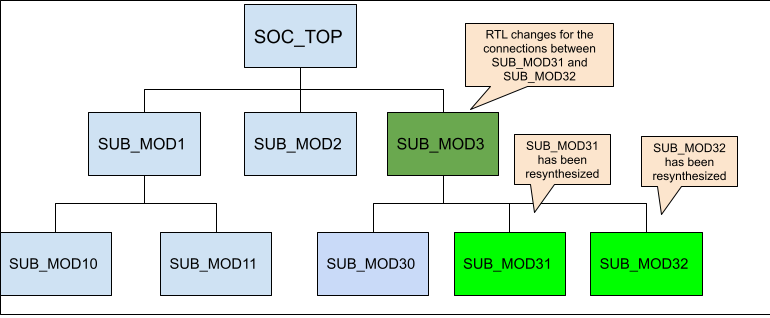
Figure 1: Sub-modules to be synthesized
Step 1: Add missing DFT ports
The newly synthesized sub-modules may lack certain ports present in the original netlist. Notably, ports essential for scan in and scan out are typically added by the DFT tool. Since the DFT process is not applied to the new synthesized sub-modules, it's necessary to incorporate these ports as dummy ones within the modules to avoid syntax errors.
The procedure for incorporating DFT ports into the newly synthesized modules is as follows:
use strict;
set_log_file("eco_add_dft_port.log");
read_library("tsmc.lib");
read_design("-ref", "SOC_TOP.pre_layout.gv");# Read in the original pre_layout netlist
read_design("-imp", "SUB_MOD31.new_syn.gv");# Read in new synthesized netlist
set_tree("ref");
set_top("SUB_MOD31_1"); # The old pre-layout netlist may have this module with prefix or suffix added in uniquify
my @ref_port_ins = get_ports("-input");
my @ref_port_outs = get_ports("-output");
set_tree("imp");
set_top("SUB_MOD31");
my @imp_port_ins = get_ports("-input");
my @imp_port_outs = get_ports("-output");
my $cnt = 0;
foreach my $port (@ref_port_ins){
  if(!grep($port eq $_, @imp_port_ins)){ # The input port is not in the new synthesized module
    new_port($port, "-input");
    gprint("$cnt: Warning input $port is not in the new synthesized sub-module\n"); $cnt++;
  }
}
foreach my $port (@ref_port_outs){
  if(!grep($port eq $_, @imp_port_outs)){ # The output port is not in the new synthesized module
    new_port($port, "-output");
    gprint("$cnt: Warning output $port is not in the new synthesized sub-module\n"); $cnt++;
  }
}
write_verilog("SUB_MOD31.dft_ports_added.gv");
exit;
The identical process should be executed on SUB_MOD32 to include the necessary DFT-related ports.
Step 2: Replace sub-modules netlist and SVF
During this step, the DFT ports added netlist and SVF files of the synthesized sub-modules are read to substitute the original pre-layout netlist and SVF files.
The procedure for replacing netlist and SVF:
set_log_file("rep_net_svf.log");
read_library("tsmc.lib");
read_svf("-imp", "SOC_TOP.pre_layout.svf");
read_design("-imp", "SOC_TOP.pre_layout.gv");
read_sub_module_svf("SUB_MOD31.svf.txt", "-module", "SUB_MOD31_1", "-syn_module", "SUB_MOD31");
read_sub_module_svf("SUB_MOD32.svf.txt", "-module", "SUB_MOD32_1", "-syn_module", "SUB_MOD32");
read_sub_module_netlist("SUB_MOD31.dft_ports_added.gv", "-module", "SUB_MOD31_1", "-syn_module", "SUB_MOD31");
read_sub_module_netlist("SUB_MOD32.dft_ports_added.gv", "-module", "SUB_MOD32_1", "-syn_module", "SUB_MOD32");
read_sub_module_netlist("SUB_MOD3.new.v", "-module", "SUB_MOD3_1", "-syn_module", "SUB_MOD3", "-sub_only"); # Need sub_only option

replace_sub_module_netlist("SOC_TOP.new_reference.gv"); # Replace netlist should be run first
replace_sub_module_svf("SOC_TOP.new_reference.svf");    # Then replace SVF
After the generation of both the top-level netlist and SVF files, they can be incorporated into the complete top-level automatic ECO process.
SVF support for multibit flops and name changes+
When working with designs that include multibit flops or significant name changes, SVF files can be a valuable tool for facilitating key point mapping. Although multibit flops are used to reduce silicon area and power consumption, the different combinations of single bit flop instances in each multibit flop instance can create challenges for key point mapping, especially when combined with name changes. Additionally, backend tools may split or merge multibit flops, further complicating the process. To avoid these challenges and ensure accurate key point mapping, it's highly recommended to load SVF files when working with multibit flops. For more information on this topic, please refer to the Multibit Flops in ECO section.
Evaluate it on the real change
Bring the reference and implementation netlists.
We will review the change scope, mapping constraints, and expected outputs, then define a focused GOF ECO evaluation.